
Introduction
Whether you’re organizing a music concert, a school fundraiser, or a seasonal sale, flyers remain one of the most powerful and cost-effective ways to promote your event or business. Even in today’s digital age, a well-designed flyer can grab attention, deliver key information instantly, and motivate people to take action.
The best part? You don’t need to hire a graphic designer or buy expensive software. With online tools, you can easily Make a Flyer Free Printable in just a few simple steps — even if you’ve never designed anything before.
In this article, we’ll walk you through how to create stunning, professional flyers for events and promotions — from choosing the right template to printing and distributing them. You’ll also learn practical design tips to make your flyers stand out and get real results.
Why Flyers Still Matter for Events and Promotions
Before we dive into the “how,” it’s important to understand the “why.” Flyers continue to be one of the most trusted and effective marketing tools for a few key reasons:
- Affordable Marketing: You can design and print hundreds of flyers for a fraction of what digital ads cost.
- Tangible and Personal: People can hold, read, and keep flyers — a personal touch that online posts can’t always match.
- Versatile Use: Flyers can be distributed anywhere — cafes, community centers, offices, or events.
- Instant Impact: A creative design can catch attention within seconds and convey your message instantly.
- Offline + Online Reach: Modern flyers can include QR codes or website links, bridging offline and online marketing.
If you’re promoting an event, product launch, or special offer, flyers can help you connect with your audience directly and effectively.
Step 1: Choose the Right Online Flyer Maker
The first step to Make a Flyer Free Printable is finding the right design platform. Fortunately, there are plenty of free online tools that make this process quick and easy — no design experience needed.
Here are some of the best options:
| Platform | Key Features | Best For |
| Canva | Drag-and-drop interface, event-specific templates, free printing options | Beginners & Event Organizers |
| Adobe Express | Advanced customization tools, professional layouts | Businesses & Promotions |
| PosterMyWall | Simple design process with large template library | Quick Event Flyers |
| VistaCreate (Crello) | Animated flyers and social media resizing options | Online + Offline Promotion |
| Fotor | AI editing tools, background remover, photo enhancements | Product or Business Flyers |
All these platforms offer thousands of templates and customizable features to help you create professional-looking flyers — completely free.
Step 2: Select a Template That Fits Your Event or Promotion
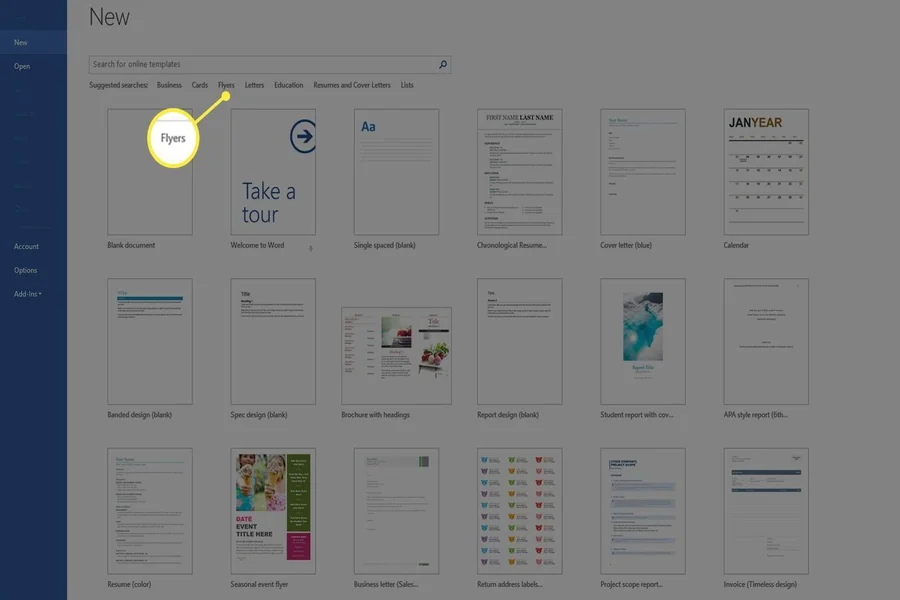
Once you’ve picked your design tool, it’s time to select a flyer template that matches your event or promotion. Most online flyer makers organize templates into categories, making it easy to find one that fits your purpose.
Here are some examples of what to look for:
- Concert or Party Flyers: Bold colors, energetic fonts, and dynamic layouts.
- Corporate Events: Clean, minimal designs with professional tones.
- Sales or Promotions: Bright colors, discount highlights, and product images.
- Charity or Community Events: Friendly, inviting designs with warm tones.
- Workshops or Seminars: Informative layouts with space for date, time, and registration details.
Pro Tip: When selecting a template, focus on layout first — you can always change the colors, images, and fonts later.
Step 3: Customize Your Flyer Design
Now comes the fun part — making the flyer your own! Here’s how to customize your design step by step:
1. Add a Catchy Headline
Start with an attention-grabbing headline. Keep it short, clear, and bold.
Examples:
- “Join Us for the Biggest Music Night of the Year!”
- “Summer Sale – Up to 60% Off!”
- “Free Workshop: Learn Photography Basics!”
2. Include Essential Information
Make sure your flyer answers these key questions:
- What: The name of the event or offer.
- When: The date and time.
- Where: The venue or location.
- Why: What’s in it for your audience (discounts, entertainment, etc.)
- How: Contact details or QR code for registration.
3. Add Images or Graphics
Use relevant, high-quality visuals. For example:
- Event photos or performers for concerts.
- Product images for promotions.
- Logo or icons for brand recognition.
Most online tools let you upload your own images or use free stock photos directly within the platform.
4. Choose Fonts and Colors Wisely
Your color scheme and fonts should match the theme of your event.
- Use bright colors for festive events or sales.
- Stick to neutral tones for corporate or professional flyers.
- Combine two or three fonts at most — one for headlines, one for body text.
5. Include a Call-to-Action (CTA)
Encourage readers to take the next step:
- “Buy Tickets Now”
- “Call to Reserve Your Spot”
- “Visit Our Store”
A clear CTA increases engagement and drives action.
Step 4: Organize and Balance Your Layout
A good flyer design is clean and easy to read. Avoid overloading your flyer with too much information. Instead:
- Use bullet points or short sentences.
- Keep enough white space for breathing room.
- Place the most important details at the top or center.
- Align text and images neatly for a professional finish.
Many online editors offer alignment tools or grids that make layout organization effortless.
Step 5: Add Branding Elements
If you’re creating a flyer for your business or brand, make sure to include:
- Your Logo: Place it at the top or bottom corner.
- Brand Colors: Stick to your business color palette for consistency.
- Social Media Handles: Add icons or links to your social platforms.
Branding helps your flyer feel cohesive and professional, while also building recognition for your business.
Step 6: Review and Finalize Your Design
Before downloading or printing your flyer, take a few moments to proofread and review everything.
Checklist:
- Spelling and grammar are correct.
- All contact information (phone, website, email) is accurate.
- Images are sharp and properly aligned.
- The message is clear and easy to understand.
If possible, ask a colleague or friend to review your flyer for a fresh perspective before finalizing it.
Step 7: Download and Make Your Flyer Printable
Once you’re happy with your design, it’s time to download it for printing. Most online platforms give you multiple file format options like:
- PDF (Print): Best for high-quality printing.
- PNG or JPG: Ideal for online sharing or small prints.
You can Make a Flyer Free Printable directly from these tools, choosing standard sizes like A4, Letter, or A5, depending on your needs.
Printing Options:
- Home Printer: For small batches or personal use.
- Local Print Shop: Great for professional-quality prints and bulk orders.
- Online Printing Services: Websites like Canva Print, Vistaprint, or Staples deliver flyers to your doorstep.
Pro Tip: Use premium-quality paper (150–200 gsm) with a matte or glossy finish to make your flyer look more professional.
Step 8: Distribute and Promote Your Flyers
Now that your flyers are printed, it’s time to share them with your audience!
Offline Distribution:
- Hand them out at busy public spots like cafes, malls, or schools.
- Post them on community boards, bulletin boards, or stores.
- Include them in product packaging or mailers.
Online Distribution:
- Share the digital version on social media (Facebook, Instagram, LinkedIn).
- Send via email newsletters or WhatsApp groups.
- Upload it to your website or event page for downloads.
Using both offline and online strategies ensures your flyer reaches as many people as possible.
Bonus Tips for Designing the Perfect Flyer
- Focus on One Goal: Each flyer should promote one event, sale, or message.
- Use High-Quality Images: Clear visuals instantly boost professionalism.
- Add a QR Code: It connects your flyer to a website or event registration page.
- Keep It Simple: Don’t clutter — clarity always beats complexity.
- Test Before Printing: Print a single copy to check layout, color, and clarity.
These small details can make your flyer more attractive and effective.
Conclusion
Creating eye-catching flyers for your events and promotions doesn’t have to be difficult or expensive. With today’s easy-to-use online design tools, anyone can Make a Flyer Free Printable in just minutes — no design skills required.
All it takes is the right template, a clear message, and your creative touch. Whether you’re promoting a concert, workshop, or sale, flyers help you connect directly with your audience — in print and online.
So, why wait? Choose your favorite flyer maker, start designing today, and get ready to spread the word about your next big event or promotion — beautifully, affordably, and effectively!
